An AWS access key in a GitHub secret works from any machine, for as long as nobody deletes it. Any workflow in the repository that can read the secret can also send it somewhere else. When someone else uses it, CloudTrail shows the same IAM user making the same kind of calls, because the key is real.
GitHub Actions doesn't need one. Each job can ask GitHub for a signed OpenID Connect (OIDC) token that names the repository, branch and workflow the job runs in, and AWS Security Token Service (STS) swaps that token for credentials that expire on their own. Nothing secret is stored in GitHub, and there's no key to rotate.
I first wrote this up in 2023, and I've wired GitHub Actions into AWS at two employers. The Terraform pipeline I run today applies changes across many Google Cloud projects and multiple AWS accounts with no long-lived cloud key in it, and I've written up how that pipeline works separately. OIDC changes the question from "who has the key?" to "which tokens will this role accept?", and a loose answer to the second question can be worse than a leaked key.
How the exchange works#
Apart from the permission, the whole exchange happens inside one step of the job:
- The job needs the
id-token: writepermission. With it, the runner sets two environment variables,ACTIONS_ID_TOKEN_REQUEST_URLandACTIONS_ID_TOKEN_REQUEST_TOKEN, which the job uses to ask GitHub for a token. Without the permission, they aren't set. aws-actions/configure-aws-credentialsasks for a token with the audiencests.amazonaws.com. GitHub's issuer signs a JSON Web Token (JWT) with RS256, and each job gets its own.- The action calls
AssumeRoleWithWebIdentitywith the role ARN, a session name, a duration and the token. This call isn't signed with AWS credentials, because the token is the proof of identity. - STS matches the token's
iss,https://token.actions.githubusercontent.com, to an IAM OIDC identity provider in the role's account. It gets GitHub's public keys from thejwks_uriin GitHub's discovery document, then checks the signature, the expiry, and thataudis one of the provider's client IDs. - STS evaluates the role's trust policy. Its conditions decide whether this job, from this repository and this branch or environment, may have this role.
- STS returns an access key ID, a secret access key, a session token and an expiry time. The action exports them as environment variables, and every later step in the job uses them.
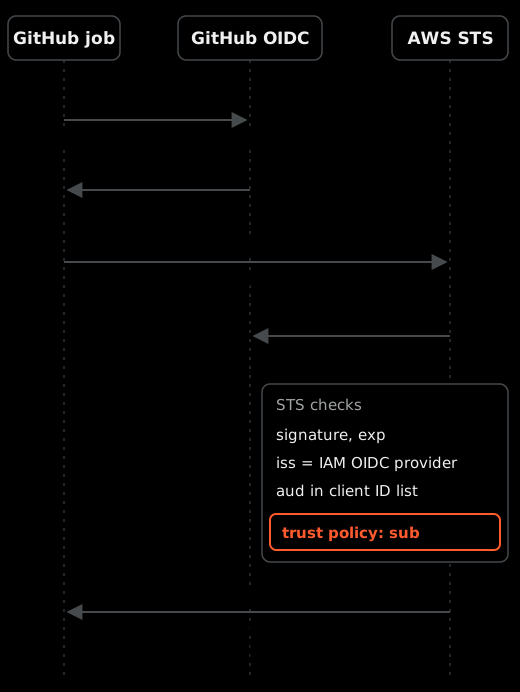
Step 4 proves that GitHub issued the token. Step 5 is the only place where your account decides which GitHub job gets in.
What the token says#
This is a trimmed payload for a job that deploys through an environment. The values are illustrative, and the real token also carries iat, nbf, exp and jti.
{
  "iss": "https://token.actions.githubusercontent.com",
  "aud": "sts.amazonaws.com",
  "sub": "repo:octo-org/octo-repo:environment:production",
  "repository": "octo-org/octo-repo",
  "repository_id": "456789",
  "repository_owner_id": "123456",
  "ref": "refs/heads/main",
  "environment": "production",
  "event_name": "push",
  "workflow_ref": "octo-org/octo-repo/.github/workflows/deploy.yml@refs/heads/main",
  "runner_environment": "github-hosted"
}
GitHub's discovery document lists more than 30 claims, but AWS can't see most of them. Of the condition keys IAM maps from an OIDC token, the two that matter for GitHub are token.actions.githubusercontent.com:aud and token.actions.githubusercontent.com:sub. GitHub's AWS guide says it plainly: custom claims aren't supported in AWS. So repository_id, workflow_ref and runner_environment are invisible to your trust policy unless they're inside sub.
And aud tells AWS nothing about who you are. The workflow picks the audience when it asks for the token, and every job that uses the official action asks for sts.amazonaws.com. A matching aud proves the token was meant for STS, and that's all. sub is the only claim AWS can check that names your repository.
By default, sub is the repository plus one context:
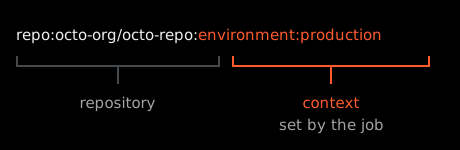
The context comes from the job, and the OIDC reference gives the rules:
| The job | The context in sub |
|---|---|
| Names an environment | environment:production |
Runs on pull_request and names no environment | pull_request |
| Runs on a branch or a tag and names no environment | ref:refs/heads/main or ref:refs/tags/v1.4.0 |
An environment replaces the branch, so a sub with an environment in it doesn't say which branch the job ran on. Repositories created after July 15, 2026 also use a newer format with numeric IDs in it, repo:octo-org@123456/octo-repo@456789:environment:production. Both details break trust policies that look correct.
The AWS side, in Terraform#
This is a trimmed example for one repository that deploys to production through an environment. It isn't a copy of anyone's real configuration, and every name in it is a placeholder. I ran terraform validate on it against version 6.68.0 of the AWS provider.
terraform {
  required_providers {
    aws = {
      source  = "hashicorp/aws"
      version = "~> 6.0"
    }
  }
}

# One per account. Every GitHub role in the account trusts it.
resource "aws_iam_openid_connect_provider" "github" {
  url            = "https://token.actions.githubusercontent.com"
  client_id_list = ["sts.amazonaws.com"]
}

data "aws_iam_policy_document" "deploy_trust" {
  statement {
    actions = ["sts:AssumeRoleWithWebIdentity"]

    principals {
      type        = "Federated"
      identifiers = [aws_iam_openid_connect_provider.github.arn]
    }

    condition {
      test     = "StringEquals"
      variable = "token.actions.githubusercontent.com:aud"
      values   = ["sts.amazonaws.com"]
    }

    condition {
      test     = "StringEquals"
      variable = "token.actions.githubusercontent.com:sub"
      values   = ["repo:octo-org/octo-repo:environment:production"]
    }
  }
}

resource "aws_iam_role" "deploy" {
  name                 = "github-octo-repo-production"
  assume_role_policy   = data.aws_iam_policy_document.deploy_trust.json
  max_session_duration = 3600
}

# What the role can do. Scope it to this job's resources.
data "aws_iam_policy_document" "deploy" {
  statement {
    actions   = ["s3:ListBucket"]
    resources = ["arn:aws:s3:::octo-site"]
  }

  statement {
    actions   = ["s3:PutObject", "s3:DeleteObject"]
    resources = ["arn:aws:s3:::octo-site/*"]
  }
}

resource "aws_iam_role_policy" "deploy" {
  role   = aws_iam_role.deploy.id
  policy = data.aws_iam_policy_document.deploy.json
}
There's no thumbprint_list. AWS checks the certificate on GitHub's key endpoint against its own library of trusted root certificate authorities, and the provider docs name GitHub as one of the issuers where configured thumbprints aren't used. My first version explained a placeholder thumbprint of all fs that its own code didn't set, and you need neither. If an older provider of yours has a thumbprint list, deleting the argument doesn't clear it, because Terraform keeps the original list.
IAM allows one provider per issuer URL in an account, and a role can only trust a provider in its own account. So each AWS account gets exactly one GitHub provider, in a shared stack, and every GitHub role in that account points at it. If you put the provider inside each repository's stack, the second repository's apply fails.
The sub condition uses StringEquals, where a * is just a character, so a typo fails closed instead of opening the role up. If a role needs more than one context, list them all in values. IAM treats several values for one key as "any of these".
The permissions policy is a separate document, and it decides the blast radius. OIDC only answers "who". A deploy role with AdministratorAccess behind a perfect trust policy is still an admin credential, held for an hour at a time by whatever code the job runs.
I'd also give each trust boundary its own role. A pull request plan job gets a read-only role that trusts repo:octo-org/octo-repo:pull_request, and the role that can change things stays behind the environment. It's the same reason my Terraform pipeline gives each stack its own least-privilege identity: a mistake in one place shouldn't reach a role meant for another.
The workflow#
This is the matching trimmed workflow. actionlint passes on it.
name: deploy

on:
  push:
    branches: [main]

jobs:
  deploy:
    runs-on: ubuntu-latest
    environment: production
    permissions:
      id-token: write
      contents: read
    steps:
      - uses: aws-actions/configure-aws-credentials@e1253824e5c10ff9df46874f81ed3ec929e19cfd # v6.3.0
        with:
          role-to-assume: arn:aws:iam::123456789012:role/github-octo-repo-production
          aws-region: ap-southeast-2
          role-session-name: gh-${{ github.run_id }}-${{ github.run_attempt }}
          role-duration-seconds: 3600

      - run: aws sts get-caller-identity
The permissions block sits on the job, not the workflow, so only this job can mint a token. Once you set any permission, GitHub sets every one you didn't list to none. That's why contents: read is there: a real job checks out code.
environment: production is what makes sub read environment:production. In the repository settings, give that environment a deployment branch rule for main, and add required reviewers if you want a person to approve each deploy.
The action is pinned to a full commit SHA, with the tag in a comment. A tag can be moved to different code, and this action handles your credentials.
role-session-name defaults to GitHubActions for every run. The CloudTrail event for AssumeRoleWithWebIdentity records the token's sub, but not which run presented it. The session name, however, ends up in the assumed-role ARN on every API call the job makes afterwards. With the run ID in it, you can go from any CloudTrail event back to the run. This is what aws sts get-caller-identity prints:
{
  "UserId": "AROAEXAMPLEROLEID:gh-1234567890-1",
  "Account": "123456789012",
  "Arn": "arn:aws:sts::123456789012:assumed-role/github-octo-repo-production/gh-1234567890-1"
}
How long the credentials last#
The session lasts for role-duration-seconds, and the default is 3600, both in the action and in STS. You can ask for anything from 900 seconds up to the role's max_session_duration, which can be set from one hour to twelve. If you ask for more than the role allows, the call fails.
The credentials don't end when the job does. The first version of this post said they did, and that was wrong. If they leak into a log, they work until they expire. So I'd set the duration a little above the longest normal run of that job, and no higher. If a job outlives its session, its AWS calls start failing with ExpiredToken partway through, which for a Terraform apply means a half-finished change.
If a session does leak, the role's "Revoke active sessions" action in IAM denies every session issued before that moment. A run that starts afterwards gets a fresh session and works as normal.
Trust policies that trust too much#
GitHub's AWS guide shows a trust policy that uses StringLike with repo:octo-org/octo-repo:*. It's easy to see why people use it: the context changes with every trigger, and a wildcard makes the first run work. This table shows who each common condition actually lets in:
sub condition | Who gets the role |
|---|---|
No sub condition, only aud | Any job in any repository on GitHub that asks for sts.amazonaws.com |
StringLike repo:octo-org/* | Every branch, pull request and environment in every repository in the org, including repositories nobody has created yet |
StringLike repo:octo-org/octo-repo:* | Every branch, tag, pull request and environment in the repository |
StringLike repo:octo-org/octo-repo* | The same, plus octo-repo-sandbox and any other repository whose name starts with octo-repo |
StringEquals repo:octo-org/octo-repo:environment:production | Jobs that name the environment, from the branches the environment allows |
The :* form is the easiest one to miss in review, because it still names your repository. With it, anyone who can push a branch can run a workflow on that branch that gets the role. Branch protection on main then protects nothing that the role can reach. I'd match the context exactly and list the few contexts a role needs.
No sub at all#
Because the workflow chooses aud, a policy that checks only aud accepts a token from any repository on GitHub. Anyone can create a repository, write a workflow that asks for sts.amazonaws.com, and assume your role if they know its ARN.
AWS now refuses to create this. For GitHub's issuer, IAM requires every new trust policy, and every edit to an old one, to evaluate token.actions.githubusercontent.com:sub. If it doesn't, IAM returns MalformedPolicyDocument. AWS calls these identity-provider controls. Existing policies aren't re-checked, though, so a role made before the rule still works exactly as it always did. The rule also only makes you test sub. What your condition allows is still your decision.
To find the old ones, list every role whose trust policy mentions the GitHub issuer, then read each one's conditions. I checked the query against a sample list-roles response, not against a live account:
aws iam list-roles \
  --query "Roles[?contains(to_string(AssumeRolePolicyDocument), 'token.actions.githubusercontent.com')].RoleName" \
  --output text
Environments without branch rules#
environment:production looks narrow, but the branch isn't in it. The environment's deployment branch rules are what stop a job on a feature branch from using it. If the environment has none, the role trusts every branch whose workflow names the environment. GitHub's guide recommends protection rules on any environment that an OIDC policy trusts, and this is the reason.
pull_request_target#
A pull_request_target workflow runs in the context of the base repository's default branch, with the base repository's permissions, even when the pull request comes from a fork. If it holds id-token: write and runs code from the pull request, that code can mint a token for your repository. Whatever sub that token carries, any role that accepts it now works for whoever opened the pull request. My Terraform pipeline plans pull requests on pull_request and never on pull_request_target, so a pull request from a fork gets no cloud credentials at all.
Names that come back#
The default sub is built from names, and names can be reused. If an organization or a repository is deleted or renamed, someone else can register the old name and mint tokens with exactly the sub your policy trusts. The OIDC specification says a subject must never be reassigned, and GitHub's immutable subject claims fix this by adding the numeric owner and repository IDs, which don't change.
Since July 15, 2026, every new repository gets the new format, and so does any repository that's renamed or transferred after that date. Older repositories keep the name format until an admin opts in for the organization or the repository.
An old policy fails closed against the new format. A new or renamed repository's job stops with Could not assume role with OIDC: Not authorized to perform sts:AssumeRoleWithWebIdentity, and a pattern like repo:octo-org/* doesn't match it either. The quick fix is a wider wildcard, and that's the wrong one. Put the IDs in the policy instead. This prints the repo part of the new format for a repository:
gh api repos/octo-org/octo-repo --jq '"repo:\(.owner.login)@\(.owner.id)/\(.name)@\(.id)"'I'd opt older repositories in as well, because the name format is the one with the reuse problem. Change each trust policy in the same rollout, since a policy that only knows one format stops matching as soon as the other one arrives.
Putting more into sub#
Because AWS reads only sub, the way to make a trust policy check something else is to put that thing into sub. An organization or repository admin can change the subject template with include_claim_keys. With ["repo", "context", "job_workflow_ref"], a job that calls a shared deploy workflow gets this sub: repo:octo-org/octo-repo:environment:production:job_workflow_ref:octo-org/octo-automation/.github/workflows/deploy.yml@refs/heads/main.
The trust policy can then require one reviewed workflow file, not only a repository. The catch is that the template changes sub for every job it covers, so every trust policy those jobs use has to change at the same time.
When it fails#
Each of these failures prints something you can search for:
Could not assume role with OIDC: Not authorized to perform sts:AssumeRoleWithWebIdentity, after a long pause, means the token'ssuborauddoesn't match the trust policy. Print the job's claims with the step below and comparesubwith the policy, character by character.It looks like you might be trying to authenticate with OIDC. Did you mean to set the `id-token` permission?means the job has noid-token: write. The job then fails later withCredentials could not be loaded, please check your action inputs. Add the permission to the job.No OpenIDConnect provider found in your account for https://token.actions.githubusercontent.commeans the account that owns the role has no GitHub provider. With several accounts, check that the role ARN points at the account you meant, and that this account has its own provider.MalformedPolicyDocumentwhen you create or edit the role means the trust policy has nosubcondition.- If the assume-role call starts failing right after you raise
role-duration-seconds, the new value is above the role'smax_session_duration. Lower one or raise the other. ExpiredTokenerrors partway through a long job mean the session ran out before the job finished.
The long pause in the first case is the action retrying. By default it tries the call 12 times with exponential backoff before it gives up, so a mismatch looks like a hang. The first version of this post said a missing permission fails silently. It doesn't: the action prints the hint in the second case. That hint is easy to miss, because the retries come after it.
This step prints the claims of the job's own token. It needs id-token: write as well:
- uses: actions/github-script@3a2844b7e9c422d3c10d287c895573f7108da1b3 # v9.0.0
  with:
    script: |
      const token = await core.getIDToken('sts.amazonaws.com')
      const claims = JSON.parse(Buffer.from(token.split('.')[1], 'base64url').toString())
      core.info(`sub=${claims.sub} aud=${claims.aud}`)
It prints claims, never the token. The token itself is a credential until it expires.
What I'd do differently#
The first version of this post started with repo:${var.github_org}/${var.github_repo}:* and said we'd tighten it later. I wouldn't write that again. The minimal example is the one people copy into production, so it should already be the exact sub the job produces. For a repository created today, that means the format with IDs in it.
OIDC also doesn't fix everything around the role. Any code the job runs can use the credentials while they last, and that includes a dependency's install script. Anyone who can change the workflow file can change what runs with the role. So the permissions policy, branch protection on the workflow files and SHA-pinned actions still matter, and the token exchange doesn't replace any of them.
If you do one thing after reading this, list the roles in each account that trust GitHub and read every sub condition. A role with a wildcard there, or with no sub at all, can let in more people than the access key it replaced.